
Dot product
The dot product, or scalar product, or inner product is a mathematical operation performed on two vectors, resulting in a single scalar number (as opposite to cross product) which results in a vector. Dot product may be calculated for any-dimensional vectors (2D, 3D, 4D, etc.).
Dot product as an angular relation of vectors
A dot product of unit vector has a very useful property - it represents an angular relation between the two vectors. When performed on two unit vectors, the dot product will result in a scalar number in a range (-1.0, 1.0), where -1.0 means the two vectors point in opposite directions, 1.0 means they point in the same direction and 0.0 means they are perpendicular to eachother. This can be visualized by the following graph:
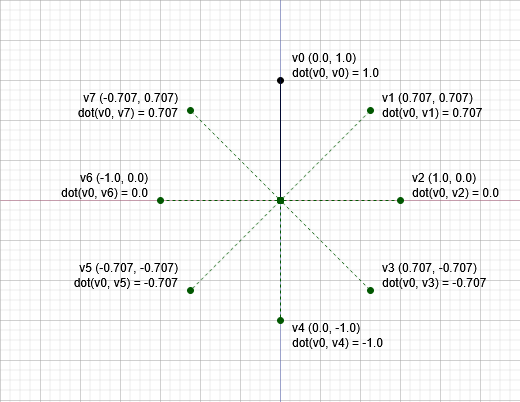
Dot product formulas
There are two ways of calculating a dot product:
- Using magnitudes and angle
- Using vectors' components
Magnitudes and angle
If a magnitude of two vectors and the angle between them is known, a dot product may be obtained by multiplying magnitudes of both vectors and the cosine of angle between them:
v1mag = 1 # Imagine a (1, 0) vector
v2mag = 1 # Imagine a (0, 1) vector
angle = math.radians(90) # They'd have 90 degrees between them
dot = v1mag * v2mag * math.cos(angle)
print(dot)

> 6.123233995736766e-17 # Approx zero
Vectors' components
Perhaps more commonly used way is to calculate the dot product directly from the components of the vectors. This is accompilshed simply by summing products of corresponding vector components:
v1 = {
    'x': 0,
    'y': 1
}

v2 = {
    'x': 1,
    'y': 0
}

dot = v1['x'] * v2['x'] + v1['y'] * v2['y']
# Or - for 3D vector - could be:
# dot = v1['x'] * v2['x'] + v1['y'] * v2['y'] + v1['z'] * v2['z']
print(dot)

> 0
GLM
GLM implements ready dot product operation as following:
v1 = glm.vec3(1, 2, 3)
v2 = glm.vec3(4, 5, 6)
dot = glm.dot(v1, v2)
print(dot)

> 32.0