
Installation
This section describes the process on installing MathVision on your system. Select the platform on which you want to install MathVision and see the instructions.
Windows
MathVision is delivered by standard installation wizard, which allows you to select which components of the application to install.
To begin, download the installer suitable for your operating system and architecture, and run it. When the installer is displayed, read the license agreement, and if you agree with it's contents proceed to the next step. In the next steps you may select where to install the application and which components to install. It is recommended to install default scripts provided with the installer, as those may be used as a good base for writing further scripts.
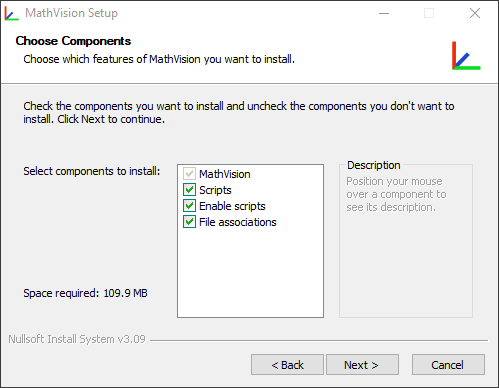
Once you've picked your choices, press Install button, and the wizard will begin the installation. The installation
may take few minutes, once it's completed you may start the application.
Depending on options you chose, you may start the application from the start menu, or directly from application's installation
directory.
Linux
MathVision is distributed as tar.gz package for Linux systems. This allows you to place MathVision in any place in your system you want it to.
To begin, download the package suitable for your operating system and architecture and extract it using
the following command:
tar -xvzf mathvision.tar.gz
Once the package is extracted, you may begin using MathVision from the directory you extracted it to.
Addin and notes installation
Optionally, you may run the setup.sh file, which will install addins and notes provided by MathVision, and create
/usr/share/applications/mathvision.desktop file. To use this file, navigate to your MathVision install directory,
and execute the script with root privileges, for example:
                    cd mathvision
                    sudo chmod +x setup.sh && ./setup.sh
As an alternative, you may move addins and notes directories to MathVision's addin directory placed in your home directory.
This can be achieved using the following command:
# Make sure your are in the directory you extracted from tar.gz package
mkdir ~/.MathVision
cp assets/addin ~/.MathVision/addin
cp assets/notes ~/.MathVision/notes