
Objects
In MathVision an object is any object that may be rendered in the render pane. Objects are registered by addins and each addin may register zero, one or more objects. MathVision allows you to create objects either calculating the vertices manually (eg. Line object) or by loading them from obj files (eg. Cube object).
An object's behavior is entirely up to user. A single object may spawn additional objects which will
belong to the spawning object in order to better represent object's intention. An good example of such an
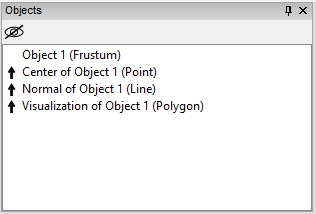
object is Frustum object provided by the application. Once such an object is added, additional
objects will be created and displayed in the Objects pane as children of the main object.
Such objects may later be accessed by other scripts in order to perform calculations on them.
Child objects
Child objects are denoted with an arrow pointing up in the Objects pane, and may be hidden
by using the eye icon at the top of the Objects pane.
Object properties
Each object may register a set of properties, which may later be used by the user or other scripts. Detailed description of object properties may be found in Object properties section of this manual.